Apache Tomcat
Layout
For installations done using the Wizard, the Apache Tomcat (CATALINA) home directory is:
/home/tomcat/apache-tomcat-v/
Where apache-tomcat-v is the version you chose to install.
The CATALINA_HOME variable is set both in the Tomcat init script as well as setenv.sh files.
Starting and Stopping
There are two ways to start/stop/restart Tomcat.
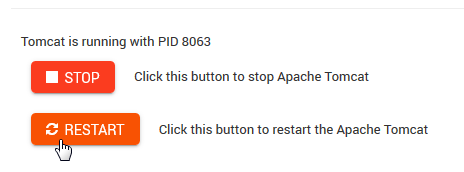
Via Module, using the Stop/Start/Restart buttons as shown below:
Via SSH, using the following commands
1 /etc/init.d/tomcat { start | stop | restart | status }
Init Script
The Tomcat init script is located in /etc/init.d and has the following content.
 1     #!/bin/bash
 2     ### BEGIN INIT INFO
 3     # Provides:        tomcat
 4     # Required-Start:  $network
 5     # Required-Stop:   $network
 6     # Default-Start:   2 3 4 5
 7     # Default-Stop:    0 1 6
 8     # Short-Description: Start/Stop Tomcat server
 9     ### END INIT INFO
10
11     # Source function library.
12     . /etc/environment;     #Catalina variables
13     . $CATALINA_HOME/bin/setenv.sh
14
15     RETVAL=$?
16
17     function start(){
18     echo "Starting Tomcat"
19     /bin/su - tomcat $CATALINA_HOME/bin/startup.sh
20     RETVAL=$?
21     }
22
23     function stop(){
24     echo "Stopping Tomcat"
25     /bin/su - tomcat -c "$CATALINA_HOME/bin/shutdown.sh 60 -force"
26     RETVAL=$?
27     }
28
29     case "$1" in
30     start)
31             start;
32     ;;
33     stop)
34             stop;
35     ;;
36     restart)
37             echo "Restarting Tomcat"
38     stop;
39             start;
40     ;;
41     status)
42
43             if [ -f "${CATALINA_PID}" ]; then
44                     TOMCAT_PID=$(cat "${CATALINA_PID}")
45                     echo "Tomcat is running with PID ${TOMCAT_PID}";
46                     RETVAL=1
47             else
48                     echo "Tomcat is not running";
49                     RETVAL=0
50             fi
51             ;;
52     *)
53     echo $"Usage: $0 {start|stop|restart|status}"
54     exit 1
55     ;;
56     esac
57     exit $RETVAL
Version
GeoHelm has been tested with Tomcat 8.x and 9.x